Ark Global 接入
- 适用于要把 Ark 接入自己中转站的下游
- 按顺序完成五步:渠道、插件、价格、客户文档、资产库
第一步:创建渠道
先到 ark 站 注册账号并创建 Key。ark 站的账号、Key 和余额与 api 站分开,两边不通用。
然后在你的中转后台创建渠道:
| 字段 | 填写 |
|---|---|
| 渠道类型 | 网关 → New API |
| 地址 | https://ark.oairoute.com |
| 密钥 | 在 ark 站创建的 Key |
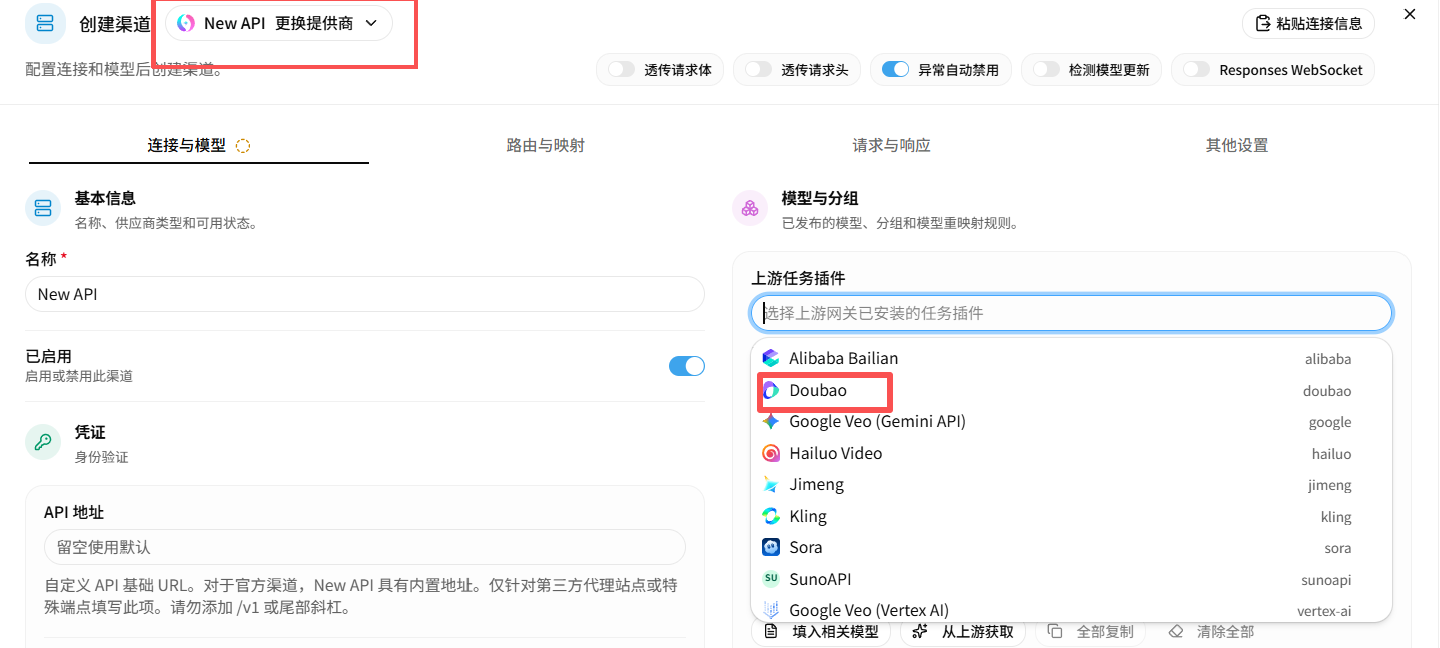
配置渠道时,在「上游任务插件」下拉里选 Doubao;渠道类型选 New API,密钥填 ark 站创建的 Key。
地址只填域名,不要加 /v1 或其他后缀。
Sign up on the ark site and create a key there. The ark site has its own accounts, keys, and balances, separate from the api site.
Then create a channel in your relay admin panel:
| Field | Value |
|---|---|
| Channel type | Gateway → New API |
| Base URL | https://ark.oairoute.com |
| Key | The key you created on the ark site |
In the channel form, pick Doubao under the upstream task plugin list; channel type New API, key from the ark site.
Enter the domain only. Do not add /v1 or any other path.
第二步:添加插件源
插件提供按秒计费,并兼容资产库接口。
在中转后台依次打开「任务插件 → 插件市场 → 管理源 → 添加源」,填入:
https://oairoute.com/plugins/index.json若你的客户不方便配置插件源,也可以直接下载插件文件发给他。
对方在中转后台打开「任务插件 → Doubao → 上传新版本」,选中这个文件即可。
The plugin adds per-second billing and supports the asset library API.
In your admin panel, open Task plugins → Plugin market → Manage sources → Add source, and enter:
https://oairoute.com/plugins/index.jsonIf your customer cannot configure a plugin source, send them the plugin file directly.
They open Task plugins → Doubao → Upload new version and pick the file.
第三步:复制价格
价格表覆盖三条计费链路(Seedance 按量、Seedance 按秒、Seedream 按次)。在文档站上点开可直接预览成表格,弹窗里可复制全文,也可用「新窗口打开」看原始 md。
美元表按国际价格设置,照抄美元数字即可,不要换算成人民币。给国内客户用的,直接用下面的人民币表:它按官方国内牌价逐档给出,与美元价不是固定汇率关系(各档约 6.50 ~ 6.67),不要自己换算。
The price list covers three billing paths (Seedance per-token, Seedance per-second, Seedream per-image). Open it to preview it as a table, copy the whole file from the dialog, or use “Open raw” for the plain .md.
The USD tables are international pricing — paste the USD figures as-is. For customers in mainland China use the CNY table below instead: it follows the vendor's domestic list price tier by tier, which is not a fixed exchange rate against USD (each tier lands around 6.50 ~ 6.67). Do not convert.
第四步:把文档发给你的客户
下面两份是不带广告的空白文档,可以直接分发给你的客户。
These ad-free docs are ready to share with your own customers.
- Chinese: https://ark-cn.apifox.cn
- English: https://ark-docs.apifox.cn
第五步:开通资产库
资产库把图片、音频、视频先入库,生成时用素材 ID 引用,上游不必每次回源拉你的地址。不接这个功能可以跳过本步。
下游要做两件事,都在后台完成:
| 位置 | 填写 |
|---|---|
| 渠道的模型列表 | 追加 doubao-asset |
| 模型价格 | doubao-asset 填 0 |
doubao-asset 是内部伪模型,不产生上游调用也不计费。没有它,素材请求会被判为找不到渠道;没有价格,会被判为未配置价格。
做完之后,你的客户直接用自己的站点令牌调素材接口,路径和方舟原生一致:
curl 'https://你的站点/doubao/api/?Action=CreateAsset&Version=2024-01-01' \
  -H 'Authorization: Bearer YOUR_SITE_TOKEN' \
  -H 'Content-Type: application/json' \
  -d '{"GroupId":"group-20241101","URL":"https://example.com/cat.png","AssetType":"Image","Name":"cat"}'
Action 可选 CreateAsset、GetAsset、ListAssets、UpdateAsset、DeleteAsset、CreateAssetGroup、GetAssetGroup、ListAssetGroups、UpdateAssetGroup、DeleteAssetGroup,匹配时忽略大小写。Version 省略时按 2024-01-01 处理。
字段与响应的完整说明见 素材库。
入库是异步的:提交后素材处于 Processing,要等 Status 变成 Active 才能用于生成。每次素材调用会在你的日志里留一条模型名为 doubao-asset、额度为 0 的记录。
The asset library stores images, audio, and video up front so generation requests reference a material ID instead of making the upstream fetch your URL every time. Skip this step if you do not need it.
Two settings on your side, both in the admin panel:
| Where | Value |
|---|---|
| Channel model list | Add doubao-asset |
| Model pricing | Set doubao-asset to 0 |
doubao-asset is an internal pseudo-model: it calls no upstream and costs nothing. Without it, asset requests find no channel; without a price, they fail as unconfigured pricing.
Once that is done, your customers call the asset API with their own site token on the same path as Ark itself:
curl 'https://你的站点/doubao/api/?Action=CreateAsset&Version=2024-01-01' \
  -H 'Authorization: Bearer YOUR_SITE_TOKEN' \
  -H 'Content-Type: application/json' \
  -d '{"GroupId":"group-20241101","URL":"https://example.com/cat.png","AssetType":"Image","Name":"cat"}'
Action accepts CreateAsset, GetAsset, ListAssets, UpdateAsset, DeleteAsset, CreateAssetGroup, GetAssetGroup, ListAssetGroups, UpdateAssetGroup, and DeleteAssetGroup, matched case-insensitively. Version defaults to 2024-01-01 when omitted.
See Asset library for every field and response.
Ingestion is asynchronous: a submitted asset stays Processing until its Status becomes Active, which is when generation can reference it. Each asset call leaves a doubao-asset log entry with zero quota.